
Using Gemini in Gmail can be a great way to introduce AI resources into your workflow. However, it may not be enough to fulfill your daily tasks. So users with a higher demand might look into alternatives to Gemini in Gmail.
Before picking one, however, it’s crucial to understand what they do (and don’t do!) and if they fit into your existing workspace. That way, you can ensure the AI investment actually helps your productivity.
This guide will help professional inbox users to find an alternative to Gemini in Gmail that changes their systems and enhances their task completion.
Does Gemini in Gmail help users?
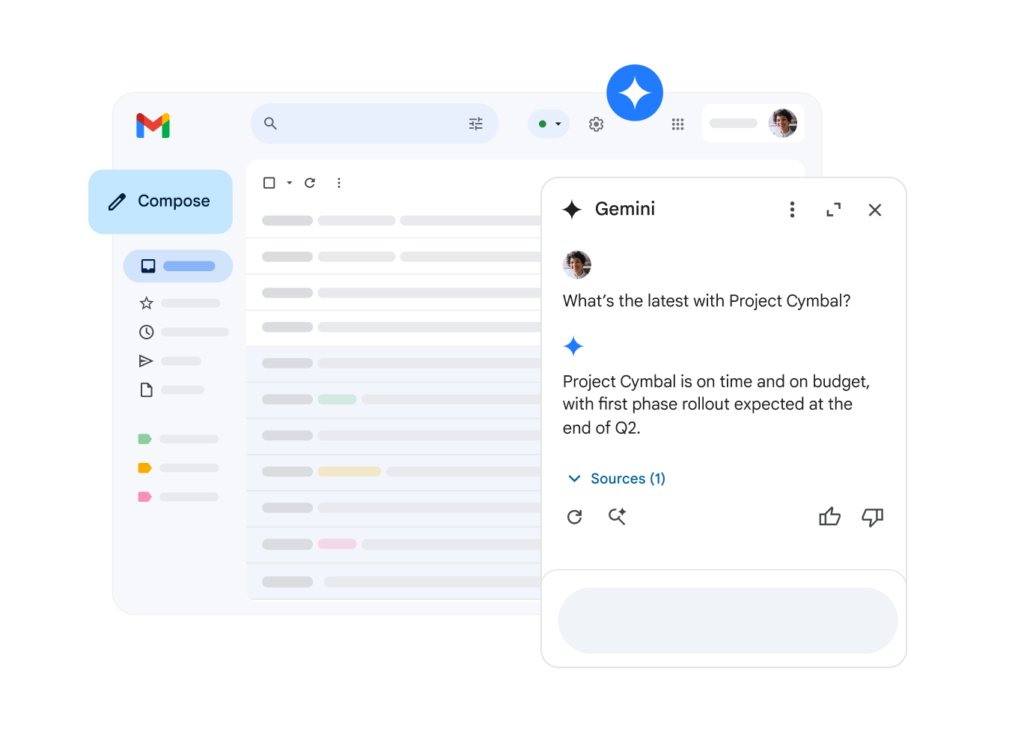
Yes, Gemini, the native AI add-on to Gmail, can be a great help to most basic tasks. It offers:
- Writing assistance: Reply draft suggestions, autocorrect and tone detection
- Follow-ups: Gemini lets you know when an email has been sitting too long on your inbox or if you need to reopen a conversation with a customer
- Thread decluttering: ask Gemini’s side chat for an email thread summary so that you can stay up to date on projects and tasks
- Deep search: Need a full-on summary? Gemini can search through your inbox history to get a glimpse of what’s been going on
What does Gemini in Gmail lack?
While the basic Gemini assistant is useful, it lacks flexibility. For one, it doesn’t interact with your other Google Workspace resources, such as Google Sheets, at least not without a paid plan. That means users have to add a subscription to their tech needs just to have AI add-ons.
Beyond that, it’s not as customizable of an experience and you’d be limited to Google’s own LLM models.
Teams that require more powerful tools, integration with other software and additional AI models won’t be able to automate all of their tasks.
How can I use other AI models as alternatives to Gemini in Gmail?
Either by asking the chatbot questions manually or by using the AI Gmail extensions of your preferred AI system.
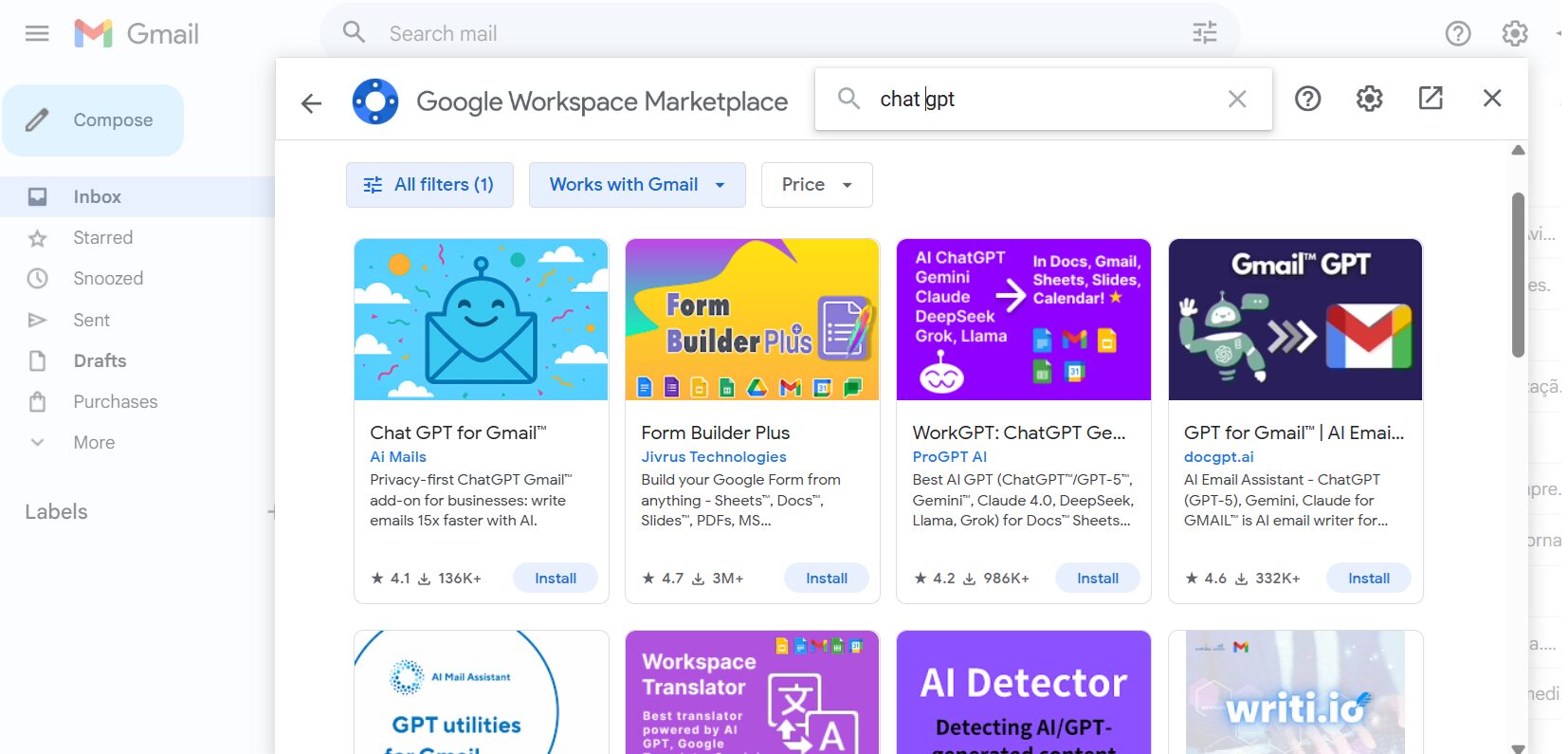
For example, if you use Chat GPT, having to ask the AI to fulfill each task and copying the answer back to Gmail can be time-consuming. As an alternative, you can take advantage of its capabilities by following these steps:
- Open your Gmail on your browser
- Click on the + button on the right sidebar:

- Here, you can browse for extensions compatible with Gmail
- Type Chat GPT (you can also filter by free or paid tools)
- Now, you’ll see a list of any available resources that fit your needs:


They will require you to authorize access to your OpenAI account as well, so it’s important to know how to get OpenAI API keys.
How to choose the right add-ons as alternatives to Gemini in Gmail
- User reviews: Before you choose, look into customer review indexes, such as Capterra and G2, to check what current users have to say about the service
- Look into official sources: don’t download any tool outside the Chrome Web Store. That way, you can guarantee developers are legitimate and not scamming for your data
- Explore the tools’ resources: see what features they offer, if there are subscription tiers and which one is the right one for you to avoid feature bloat and budget issues
- Check security measures: each tool you add to your tech system has to follow adequate data security measures and incident guardrails. That protects your sensitive professional data in case of leaks and invaders.
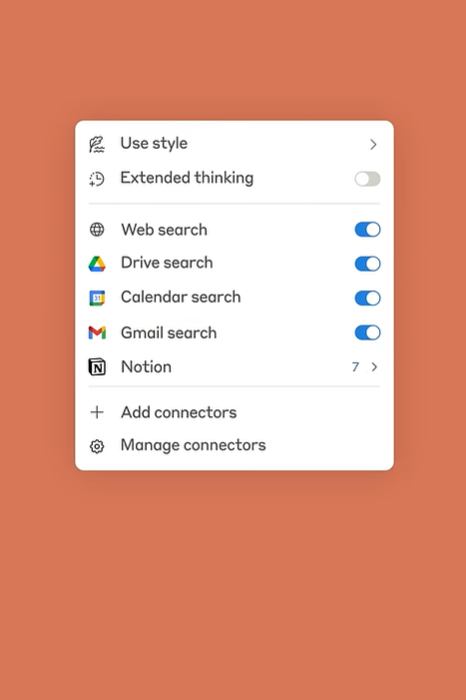
Another good alternative to Gemini in Gmail is using Claude, Anthropic’s AI model that can help with many daily tasks in a professional environment. If you connect Claude to Gmail, among many other features, you can:
- Extract data from multiple sources to detect customer sentiment for market research
- Get writing assistance
- Test and offer solution for code-based tasks
- Search through your inbox to get context-based answers
source: Anthropic
What are the pros and cons of using other AI models as alternatives to Gemini in Gmail?
The biggest advantage of using other LLMs with your Gmail account is that you can go beyond the basic Gemini resources. You can connect them through Chrome extensions, use the built-in connection (with Claude) or even through third-party automation resources, such as Zapier.
That means the process is very user-friendly and can transform the way you work.
However, it’s worth noticing that these tools can add to the budget quickly, especially when you require higher levels of automation. Both Claude and ChatGPT have limitations on their free tiers. If you need
- Instant response times
- Cross-platform automation tasks
- Higher message volume
- Longer context history windows
You will need paid subscriptions to fulfill your company’s workflows. Those start at $20/month, but can get higher depending on task volume.
However, this is just the cost of the AI model subscription. Add-ons to fully connect the platforms to your inbox can be free, but limited as well. So for full automation, paid plans are a need and those can affect your budget as well.
Are AI email assistants good alternatives to Gemini in Gmail?
Yes, especially for users that want to integrate Google Workspace tools, but with a higher level of customization.
Unlike AI email clients, AI email assistants such as HeyHelp are built to work inside Gmail. That means you can enhance your existing inbox with AI-powered resources, but you don’t lose existing automations, connection to Google Workspace or access to add-ons you need.
With HeyHelp, you can automate:
- Email triage: custom filters, prioritization, auto deleting and archiving before you log in, no need to prompt an AI window
- Smart replies: pre-written based on message tone, interaction and inbox history, ongoing projects and specific needs
- Follow-up reminders and automations
- AI scheduling: HeyHelp integrates with your calendar to help set up better conversations at the right time:
What’s the biggest advantage of using an AI email assistant?
The ability to build a better inbox system with time. An email assistant such as HeyHelp can learn from your usage of it and inbox behavior. So your own labeling and filtering can guide the automations. Instead of having to manually set them up with Gmail, you can let the platform learn the way you work and create a better workspace for your own specific needs.
Beyond that, AI email assistants can be cost-effective, fulfilling the needs most users need without feature bloats and closed systems. HeyHelp, for example, is priced at $12/month.
The importance of flexibility for alternatives to Gemini in Gmail: BYOK
Gemini is regarded as an useful, but inflexible tool. So alternatives should be adaptable and fulfill the needs of any company’s workspace. HeyHelp was developed to be a bring your own key (BYOK) platform.
That means users aren’t locked into just one AI provider. Instead, they can add API keys from Claude, OpenAI or Gemini and bring each one to help when needed. So when setting up specific automations, they can choose the one that works best for the task and project at hand.
Are there AI-based inboxes as alternatives to Gemini in Gmail?
Yes. These are full-on inboxes that bring AI power directly to your emails. Tools such as Superhuman AI or Shortwave are email clients you can manage your messages on. That way, you can get a more customizable experience instead of adding AI tools to your existing inbox.
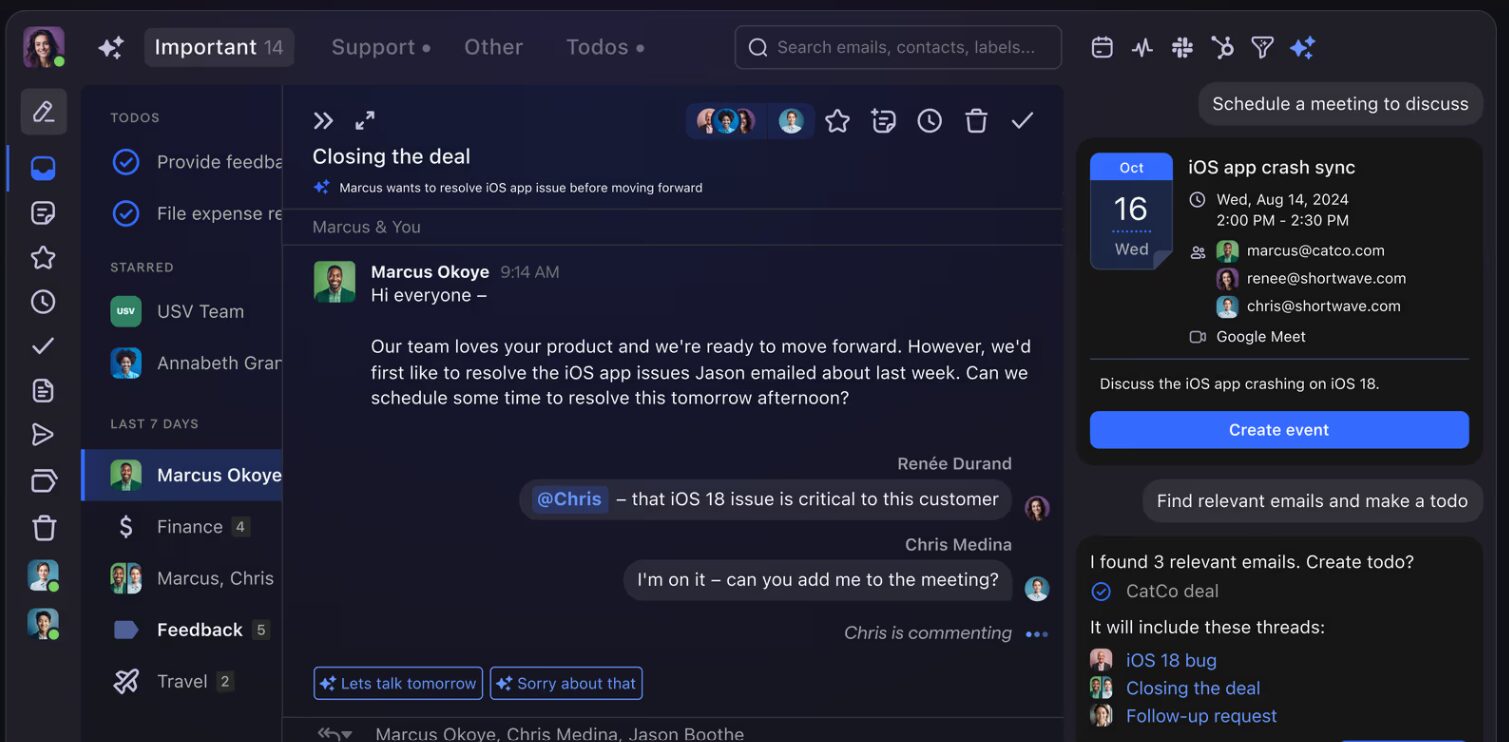
Some key resources offered by these platforms are:
- Automated filters and priorities
- Response drafts based on your tone and context
- Meeting notes
- Instant unsubscribing
- Read email notifications
- Team collaboration tools
- Contact management
- Calendar integration
What are the pros and cons of AI email clients?
The main pro is being able to create an AI inbox management system that works for each team and user. That way, you don’t have to settle for basic automations, but find the right client that includes what you need.
However, each tool has different pricing points, so it’s important to look into them and check if they fit your budget concerns. For the starter plans, the average is around $30/user/month.
There is, however, a main disadvantage of moving your email to another client: the integration with Gmail isn’t full. That means, for instance, your drafts aren’t automatically Gmail drafts, labels stay within the client itself, and so on.
So if you decide to change platforms later, it may take a long time to redo your workspace system.
Additionally, there’s limited compatibility with other Gmail add-ons, so if the platform doesn’t offer a feature you need, you won’t be able to automate it.
What’s the best alternative to Gemini in Gmail?
| Other LLMs (ChatGPT, Claude, etc.) | AI Email Clients | AI Email Assistants (HeyHelp) | |
|---|---|---|---|
| Integration | Depends on API or extension (can connect to Gmail, Docs, Sheets, etc.) | Replaces Gmail fully and works as a new inbox | Works inside Gmail and connects to Google Workspace and other tools |
| Flexibility | Users can choose from OpenAI, Claude, Gemini or whichever AI model they prefer | Customizable but tied to the client’s system | BYOK system (connect Gemini, Claude, OpenAI) for flexible automations |
| Usability and setup | Requires manual setup and Chrome extension integration | Requires migration to a new client | Simple Gmail add-on installation |
| Automation level | High (depends on API automation level) | High (end-to-end workflow automation) | Very high (contextual and self-learning) |
| Cost | Paid plans (~$20+/month) for the AI model + different costs for extensions to connect with Gmail | Average ~$30/user/month | Directly connects to Gmail for $12/month |
| Compatibility with other Gmail add-ons | Users can add other resources from the web store | Drafts, labels and other customization may not sync and you can’t add other resources beyond what the client offers | Built to enhance Gmail, not replace it |
| Security matters | Depends on API provider, users must opt for verified extensions | Varies by client, pay attention to terms and conditions | Uses Gmail’s native security and user-controlled AI keys (BYOK) |
Conclusion: Finding the Best Alternatives to Gemini in Gmail
Gemini for Gmail is a good starting point for basic AI assistance to your workflow needs. But more flexibility, personalization, and integration power are required for complex tasks, so exploring alternatives to Gemini in Gmail matters.
Whether you choose LLM-powered extensions like ChatGPT or Claude with Gmail add-ons, AI email clients like Superhuman or Shortwave, or AI assistants like HeyHelp that work directly inside Gmail, the goal is saving time, automating repetitive tasks, and make your inbox work better for you.
For most professionals, the best approach is to pick a solution that fits how your team already works. If you need full automation inside Gmail, an AI email assistant will give your a flexible, AI-powered system that can enhance productivity and improve your workflow.
FAQ: Gemini in Gmail alternatives
What is the best alternative to Gemini in Gmail?
The best alternative depends on your needs. For all-in-one Gmail automation, HeyHelp AI is one of the most effective assistants because it works inside Gmail, automates triage and replies, and supports multiple AI models.
Are there free alternatives to Gemini in Gmail?
Yes. Many AI Gmail extensions connected to ChatGPT or Claude offer free plans, as do the platforms themselves. These allow you to draft replies, summarize emails, and generate responses without paying extra. However, for higher task volumes or full automation, most tools require a paid plan.
How do AI email assistants compare to AI clients?
AI email assistants like HeyHelp enhance Gmail directly and sync messages, labels, contact information and filters, along with Google Workspace integration and other extensions, intact. AI clients, on the other hand, such as Superhuman or Fyxer, create a new inbox experience with built-in AI features but limited Gmail integration.
What should I look for when choosing an alternative to Gemini for Gmail?
When comparing alternatives to Gemini in Gmail, focus on:
- Integration: Does it work natively with Gmail or require migration?
- Flexibility: Can you connect your own AI keys (BYOK) or switch models?
- Automation level: Does it learn your inbox behavior over time?
- Cost and security: Make sure pricing fits your workflow and the tool uses verified extensions.